How Many Concurrent Users Can Your Query Actually Handle?
Every query has a breaking point. Run it for one user and it looks instant. Run it for fiftyusers at the same time and you might discover blocking, memory grant waits, or a CPU curvethat bends the wrong way. The trouble is, most teams find their query’s breaking point byaccident, in production, during the one week they could least afford it.
Query Loading Ramp, included free with Database Health Monitor, has a feature builtspecifically to answer this question on purpose, ahead of time: Breaking Point Finder.
What Breaking Point Finder actually does
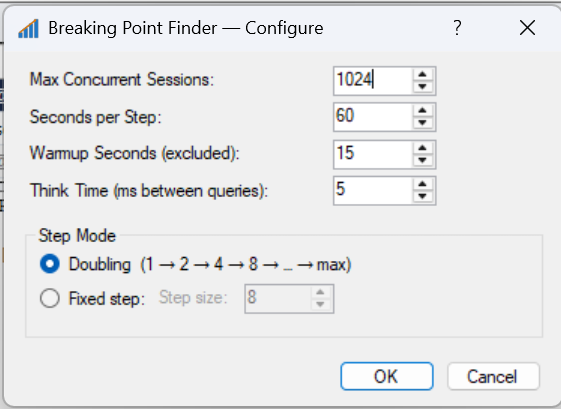
Instead of you guessing a session count and running one test, Breaking Point Finder runs aseries of short steps at increasing concurrency – 1, 2, 4, 8, 16 sessions, and so on (or afixed increment if you prefer finer granularity). At each step it measures throughput andlatency, then moves to the next step automatically.
It keeps going until it detects a plateau – a step where throughput barelyimproved over the step before it – and stops on its own. You do not have to babysit the runor decide in advance how far to push it.
The knee is the number that matters
The single most useful output of the whole test is what we call the knee: thelast concurrency level before throughput gains dropped off and latency started climbing. Thatnumber is your practical answer to “how many concurrent users can this query handle?” Pushpast the knee and you are paying a steep latency penalty for very little extra throughput.
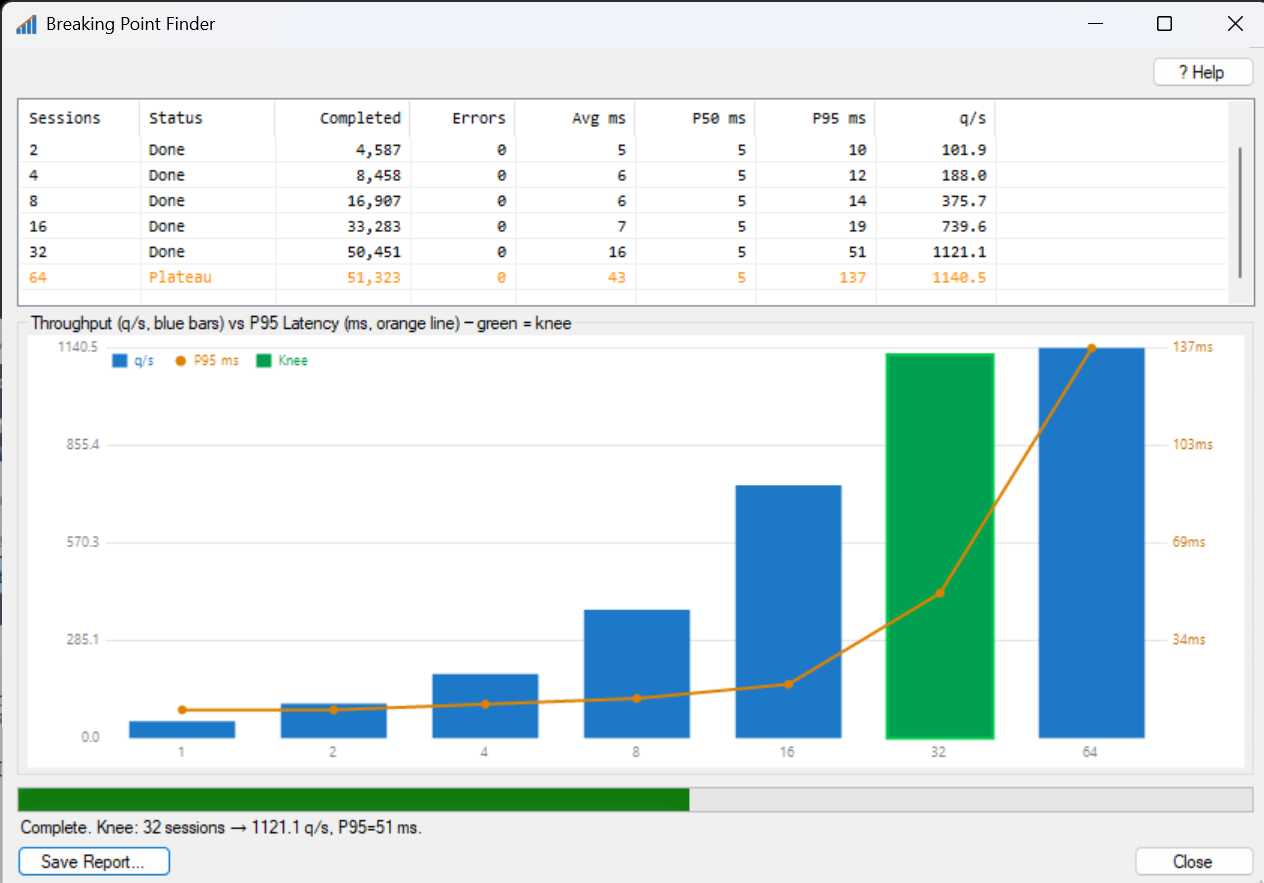
The report gives you a chart with the knee highlighted, plus the full step-by-step table:sessions, throughput, average latency, P50, P95, and error count for every step along the way.
Multiple passes, not one
A good way to use it: run once in Doubling mode with zero think time to find the roughbreaking point quickly. Then run again in Fixed Step mode, narrowed to the range around thatknee, with a realistic think time, to pin down the number that actually matches yourapplication’s behavior.
Why this beats a manual test
You could run a dozen separate load tests by hand at different session counts and compare thenumbers yourself. Breaking Point Finder does that work in one run, finds the inflection pointfor you, and gives you a single chart you can show to a teammate or a manager without makingthem read twelve separate reports.
Try Query Loading Ramp free inside Database Health Monitor to find your query knee today at DatabaseHealth.com.
Query Loading Ramp – part of Database Health Monitor, by Steve Stedman, Stedman Solutions, LLC – www.stedmansolutions.com
Check out this offer:Explore our Database Health Monitor special pricing.
Here are all the discounts for Database Health Monitor. Pick the one that fits your server count.
25% off 1 Instance – Code: 25OFF1
25% off 10 Instances – Code: JULY25
25% off 20 Instances – Code: 25OFF20 – Best Value
Free SQL Server Performance Tuning Course
During the second week of July, every new one-year Database Health Monitor subscription includes our SQL Server Performance Tuning Course at no extra charge. Learn proven techniques for identifying bottlenecks, analyzing waits, improving query performance, and resolving common SQL Server performance issues. Combined with the monitoring and diagnostic capabilities of Database Health Monitor, this course helps you move from simply identifying problems to solving them effectively. A $299.99 value included free with your purchase.